Cat Ninja: Controls, Crystals, Traps, and Level Strategy
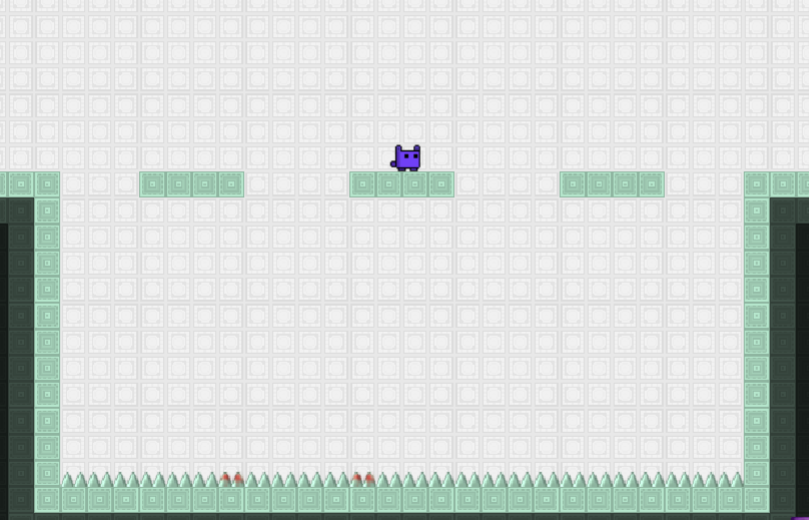 In Cat Ninja your mission is to recover the scattered pieces of a magical energy crystal before the world is destroyed. Every level places crystal parts between spikes, mines, lasers, breakable blocks, and other traps designed to punish careless movement.
The cat can run, double-jump, climb between normal walls, roll through narrow spaces, and smash downward through certain objects. These moves give you several ways to cross a room, but they also make it easy to move faster than you can react. Most failed runs come from holding a direction too long, using the second jump too early, or entering a trap before understanding its pattern.
Early stages introduce one mechanic at a time. Later levels combine wall-jumps, switches, timed lasers, sticky surfaces, gravity changes, teleporters, and other hazards. The challenge comes from learning how these mechanics connect rather than simply reaching the end as quickly as possible.
| Action | Keyboard Control |
|---|---|
| Move left or right | A/D or Left/Right Arrow Keys |
| Jump | W or Up Arrow |
| Double-jump | Press the jump key again while airborne |
| Wall-jump | Jump toward a normal wall and push away from it |
| Roll | Hold Down while moving left or right |
| Ground pound | Press Down while airborne |
| Restart the level | R |
| Music and sound | Use the in-game audio buttons |
The ground pound has several uses. It can break glass, smash boxes, and activate red floor buttons. Try to land directly in the middle of a button because hitting its edge may not trigger it correctly.
How to Play Cat Ninja
Collect every required crystal piece while moving through rooms filled with traps. The game provides short instructions when it introduces a new ability, but later stages expect you to remember those moves and combine them without much warning.
Do not begin each level by running directly toward the exit. First, check where the crystal pieces are and identify anything that changes the room.
- Red buttons connected to laser barriers
- Sticky walls that block wall-jumping
- Glass and boxes that can be broken
- Gravity switches
- Lasers that turn on and off automatically
- Checkpoints and safe platforms
- Crystal pieces placed above or below the main route
The shortest-looking route is not always the correct one. A crystal piece may require you to climb a wall, activate a switch, break a floor, or approach the room from another direction.
How to Control the Cat Near Traps
The cat gains speed quickly, and that momentum can carry you farther than expected after releasing a movement key. This becomes dangerous near spikes and mines, where a small landing error can end the attempt.
Release the movement key shortly before landing on a narrow platform. This helps the cat land closer to the center instead of sliding over the opposite edge.
Use short taps when adjusting your position beside a red button, wall, or small gap. Holding a direction works well during long jumps, but it gives you less control when the safe area is only a few steps wide.
How to Use the Double-Jump
The second jump works best as a correction tool. A common mistake is pressing the jump button twice immediately. That gives you height, but it removes your chance to adjust after seeing the next platform or hazard.
Use the first jump to establish your direction. Save the second jump until you need to:
- Clear the top of a wall
- Move away from a spike or mine
- Extend a long crossing
- Reach the opposite side of a vertical shaft
- Correct a jump that started too early
- Avoid a trap that activates in midair
When climbing between walls, wait until the cat touches the surface before pushing away. Pressing the opposite direction too early can make the cat fall without completing the wall-jump.
How Sticky Walls Work
You cannot wall-jump from sticky walls. When the cat reaches one of these surfaces, repeatedly pressing jump will not help and may cause you to fall into the hazard below.
Look for another route, a nearby platform, a switch, or a normal wall that can be used instead. Test unfamiliar surfaces from a safe position before committing to a long climb.
How to Turn Off Laser Barriers
Lasers Controlled by Red Buttons
When a red button appears near a laser, jump above the button and press Down while airborne. The cat will ground-pound the switch and disable the barrier.
Do not run toward the laser immediately after touching the button. Check that the beam has disappeared first. An off-center landing may look correct without activating the switch.
Lasers That Switch Off Automatically
Some laser barriers do not have a nearby button. These lasers operate on a repeating timer.
Stand at a safe distance and watch one complete cycle before moving. Enter just after the beam switches off instead of trying to cross during its final active moment. Waiting for another cycle costs less time than restarting the section.
How Gravity Changes Affect the Level
Gravity switches can place the cat on the ceiling or make another surface act as the floor. The movement keys remain the same, but the new orientation can make familiar controls feel confusing.
After gravity changes, pause on the first safe surface and make one small movement. This confirms which direction the cat will travel before you attempt a full jump.
The most common mistake is continuing to hold a direction during the transition. The cat may enter the rotated area with too much speed and slide directly into a spike, mine, or laser.
- Find the new floor.
- Locate the next safe landing.
- Check whether you need a normal jump or double-jump.
- Move only after the new orientation becomes clear.
How to Use Rolling and Ground Pounds
Rolling helps the cat pass through low spaces and carry speed across open ground. It works best when you can already see the route ahead.
Avoid rolling into an unexplored room. The extra momentum makes it harder to stop when a mine, spike wall, or laser appears near the edge of the screen.
A ground pound sends the cat directly downward. Use it to:
- Break glass
- Smash boxes
- Press red switches
- Drop quickly onto a lower platform
- Reduce sideways movement during a landing
Check the space below before using it. Breaking the correct object does not help when spikes or mines are waiting underneath.
How the Difficulty Builds
The opening levels focus on basic running, jumping, and obstacle recognition. Platforms usually provide enough space to recover from a poor landing.
Later stages reduce that recovery room. A wall-jump may lead directly into a timed laser. A gravity switch may place spikes on what used to be the ceiling. A ground pound may activate a button but leave the cat in a dangerous position for the next jump.
The game also uses traps that become clear only after you move into their range. Instead of trying to complete every new section at full speed, use the first attempt to learn what activates and where the safe spaces are. The next attempt can then focus on clean execution.
How to Survive Longer
- Save the second jump until you can see where the cat needs to land.
- Release movement shortly before landing on a small platform.
- Watch a complete laser cycle instead of guessing its timing.
- Aim for the center of red buttons when using a ground pound.
- Test unfamiliar walls before relying on a wall-jump.
- Check below glass and boxes before smashing through them.
- Collect nearby crystal pieces before entering a difficult final section.
- Slow down after reaching a checkpoint and study the next trap.
Common Mistakes That End a Run
Running at Full Speed Everywhere
Speed helps in open sections, but most deaths happen near transitions. Slow down before switches, narrow platforms, gravity changes, and unfamiliar rooms.
Using Both Jumps Too Early
An immediate double-jump gives you quick height but removes your emergency correction. Delay the second press until you know where it is needed.
Trying to Jump From Sticky Walls
Sticky surfaces disable wall-jumping. Search for another route instead of repeatedly pressing the jump key.
Entering a Laser Without Checking Its Type
A timed laser requires patience, while a button-controlled laser requires interaction. Look for a red switch before attempting the crossing.
Ground-Pounding Without Checking Below
Make sure there is a safe platform under the object you are breaking. Spikes may sit directly beneath glass or boxes.
Holding a Direction During a Gravity Change
Release the movement key during the transition. Regain control after the cat lands on the newly positioned floor or ceiling.
Browser and Device Compatibility
Cat Ninja was originally designed as a keyboard-controlled browser game. Modern websites may run it through an emulator or a converted version, so loading speed, audio, controls, and save behavior can vary between websites.
A desktop or laptop with a physical keyboard provides the most reliable control. The game requires quick combinations such as jumping while changing direction or pressing Down during a jump.
Mobile and tablet support depends on whether the website provides working touch controls. A page may load the game on a phone without offering enough on-screen buttons to perform every action.
When the game does not load or respond correctly:
- Refresh the page after the game window appears.
- Make sure JavaScript is enabled.
- Try an updated version of Chrome, Firefox, or Edge.
- Click inside the game window before using the keyboard.
- Close unnecessary tabs when movement or audio begins to lag.
- Check that the browser has not muted the game tab.
- Avoid changing tabs during a level because the game may lose keyboard focus.
Cat Ninja FAQ
What is the objective in Cat Ninja?
Collect the missing energy crystal pieces and complete each platforming level without touching deadly traps.
How do you double-jump?
Press the jump key once to leave the ground, then press it again while the cat is still airborne.
How do you break glass and boxes?
Jump above the object and press Down to perform a ground pound.
How do you turn off a laser?
Look for a nearby red button and hit it with a ground pound. When no button appears, wait for the laser to switch off automatically.
Why is the red button not working?
Your ground pound may have landed beside the button instead of directly on it. Reposition the cat and drop onto the center.
Why can’t I jump from a wall?
Some walls have a sticky surface that disables wall-jumping. Find another route, platform, or normal wall.
How do you restart a level?
Press the R key.
Can Cat Ninja be played on a phone?
Only when the hosting website provides suitable touch controls. The original control system works more reliably with a keyboard.
Is Cat Ninja a speedrunning game?
You can try to complete levels quickly, but the main objective is collecting the crystal pieces and surviving the traps. Learning the route usually produces a faster run than rushing into unfamiliar hazards.
Who should play Cat Ninja?
Cat Ninja suits players who enjoy difficult platformers, repeated attempts, hidden trap patterns, and levels that require both quick reactions and route planning.
Walkthrough